Assistant Agent
Personal AI assistant and experimentation platform for exploring tools, memory, context management, reusable skills, agent strategies, execution controls, and evaluation.
- Date
- Jun 2026
- Updated
- Oct 2026
- Status
- Active
- Tags
- Tech
- Python, FastAPI, TypeScript, Next.js, assistant-ui, PostgreSQL, pgvector, Alembic, Pytest, Vitest, DeepSeek
- Links
- Repository
Overview
Assistant Agent is a personal AI assistant and an experimentation platform for exploring how useful agentic systems can be designed in practice. It combines a normal conversational interface with tool use, semantic memory, persistent conversations, context management, reusable task guidance, alternative agent strategies, execution controls, and evaluation infrastructure.
The project is intentionally broader than a single-purpose assistant. Its purpose is to give me a common environment for studying different parts of agent development without rebuilding the surrounding application for every experiment. Tools, memory, context, skills, planning, execution controls, and evaluation are separate but connected areas within the same platform. Some are already implemented in depth, while others remain early experiments that I can develop and compare over time.
The current assistant can already perform useful tasks, but the larger value of the project is the framework around it. I can introduce a new tool, retrieval method, skill format, planning approach, context-management technique, or safety control and observe how that choice changes the behaviour, reliability, cost, and usability of the same assistant.
The current system uses a FastAPI backend, a Next.js frontend built on assistant-ui, PostgreSQL for conversations and durable execution state, pgvector for semantic memory, and DeepSeek or other OpenAI-compatible model providers.
What the assistant does
From the user’s perspective, the project works as a persistent personal assistant. A user can:
- Sign in and maintain multiple conversation threads.
- Ask ordinary questions and receive streamed responses.
- Let the assistant use tools for calculation, web research, file access, user context, memory, and other supported tasks.
- Store and retrieve semantic memories when longer-term context is useful.
- Review sensitive actions before they execute.
- Resume an approval-paused task after refreshing or returning later.
- Inspect how a run progressed, which actions were proposed, why an action was rejected or approved, and whether it was actually dispatched.
The product is designed to feel like a normal chatbot while still making the important parts of agent behaviour inspectable.
Demo
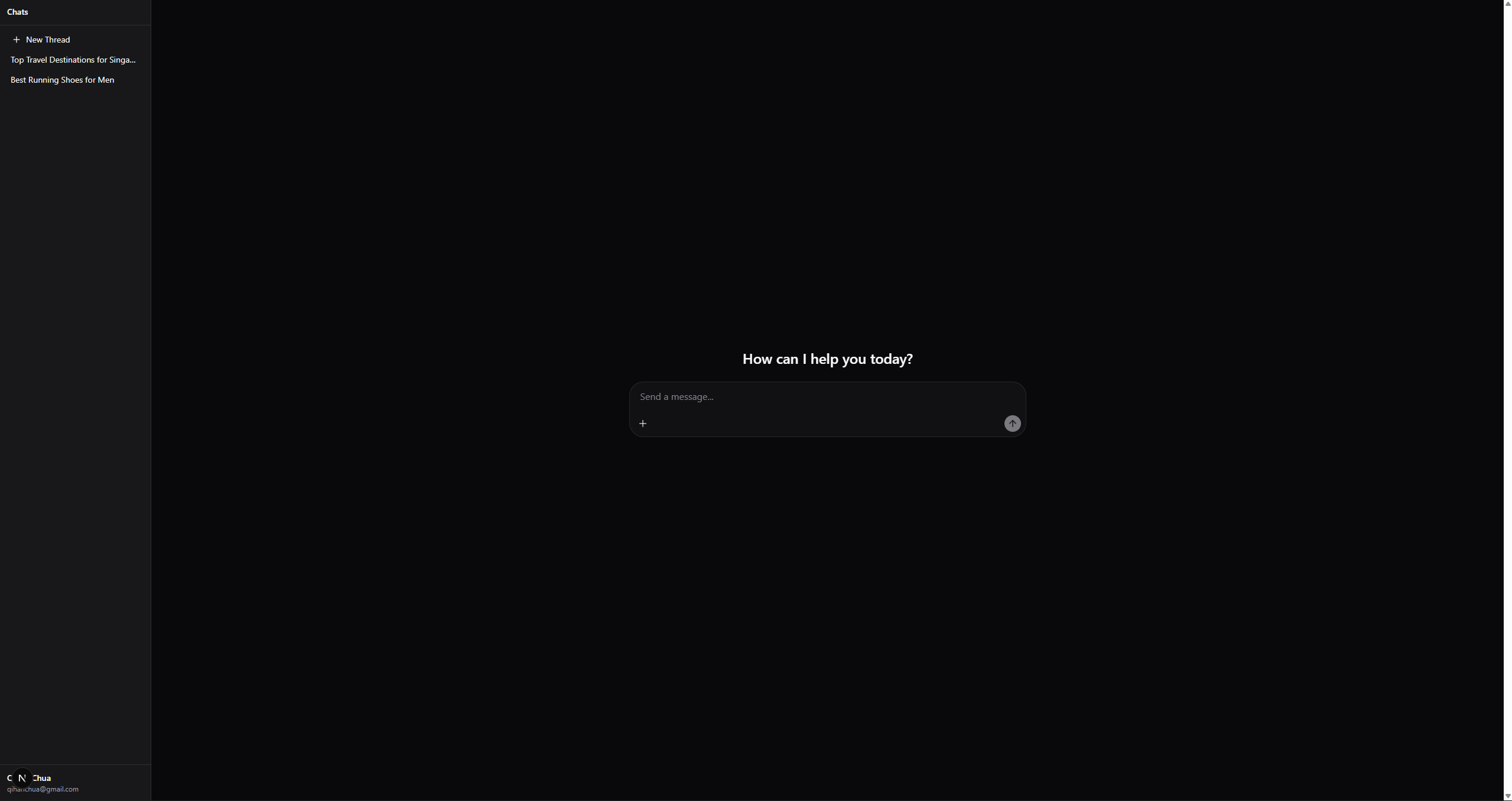
1) Sign in and start a conversation
The user signs in and enters the main assistant interface. Existing threads appear in the sidebar, allowing an earlier conversation to be continued or a new one to be created. Authentication also scopes threads, runs, approvals, and audit records to their owner.

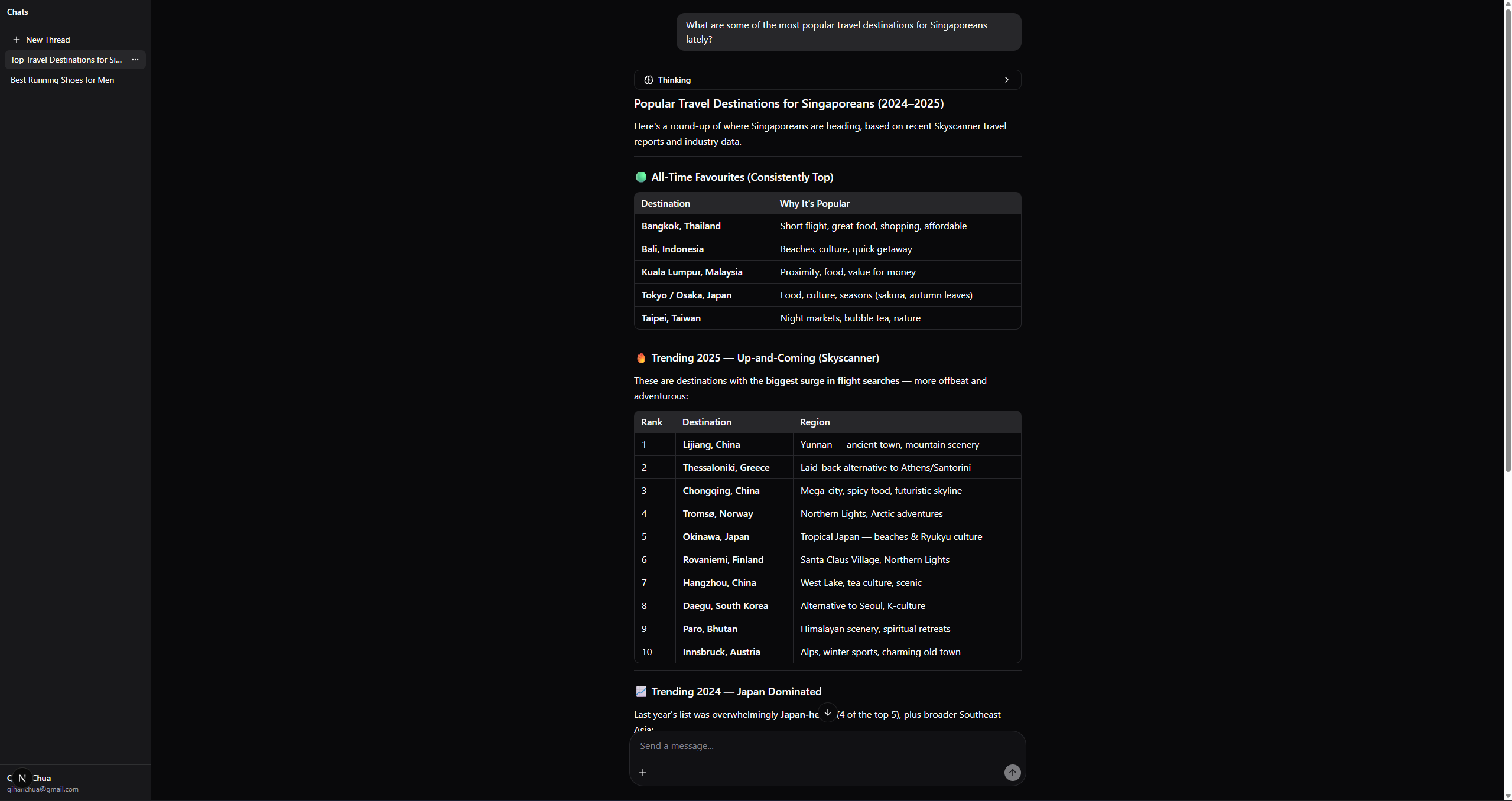
2) Ask a question or start a task
The user interacts with the assistant like a normal chatbot. The assistant can answer directly or decide that it needs one or more tools. Responses and safe execution events are streamed back to the interface while the conversation and run state are saved.
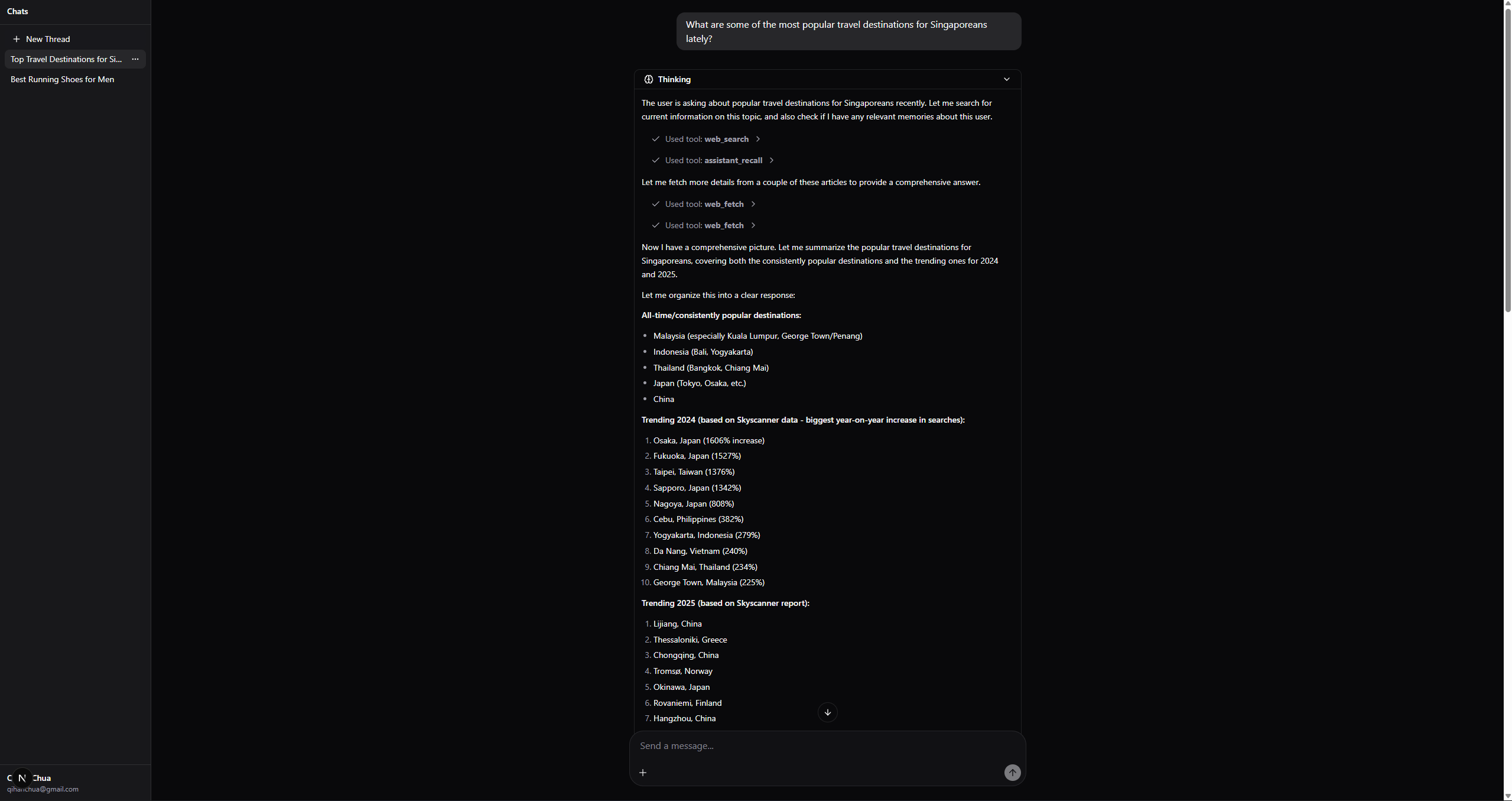
3) Observe tool activity
When tools are used, the interface shows structured activity such as the tool being requested and its result. It can also display safe planning and execution events. Private provider reasoning and hidden chain-of-thought are not exposed to the user.
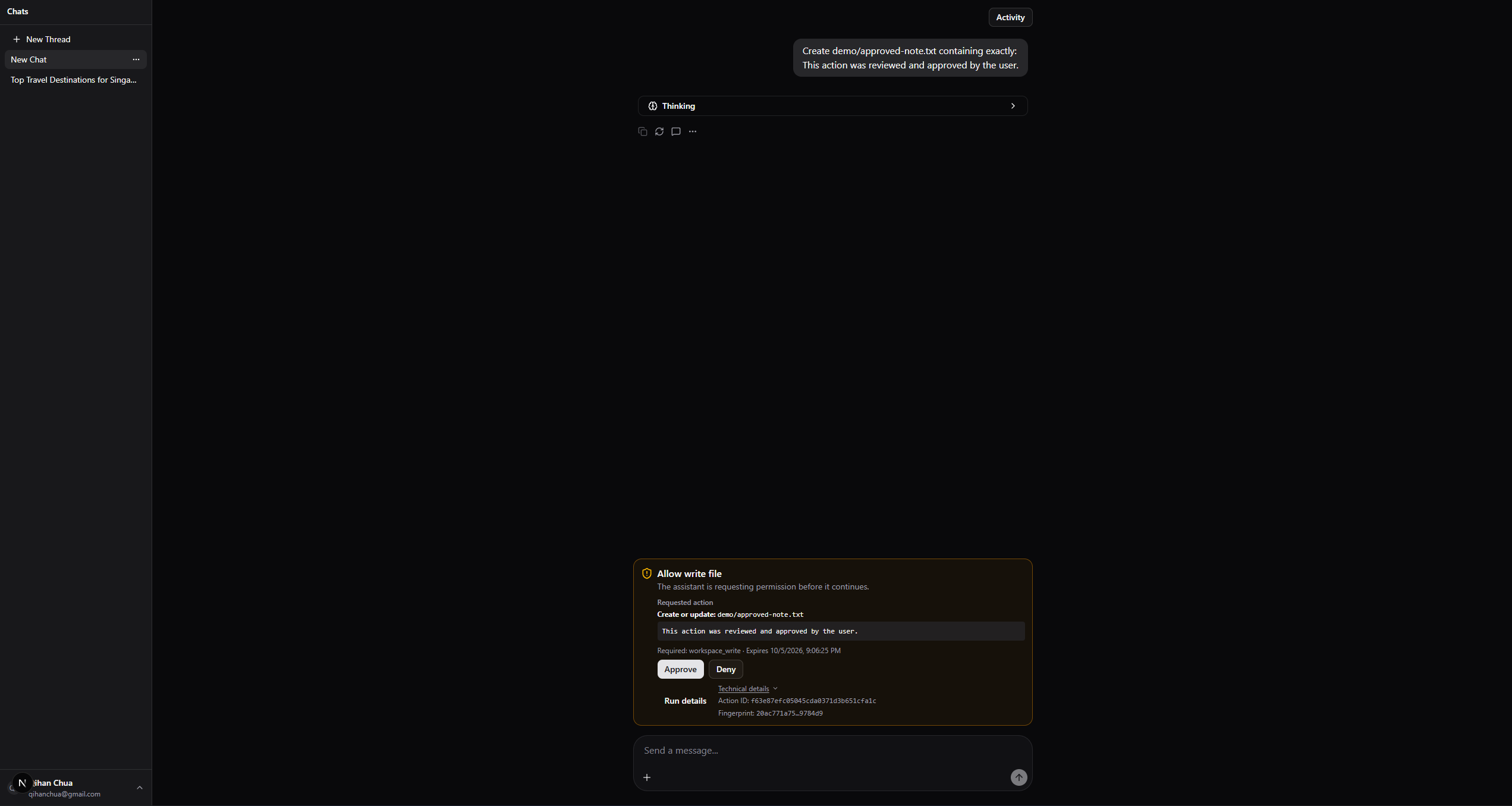
4) Propose a sensitive action
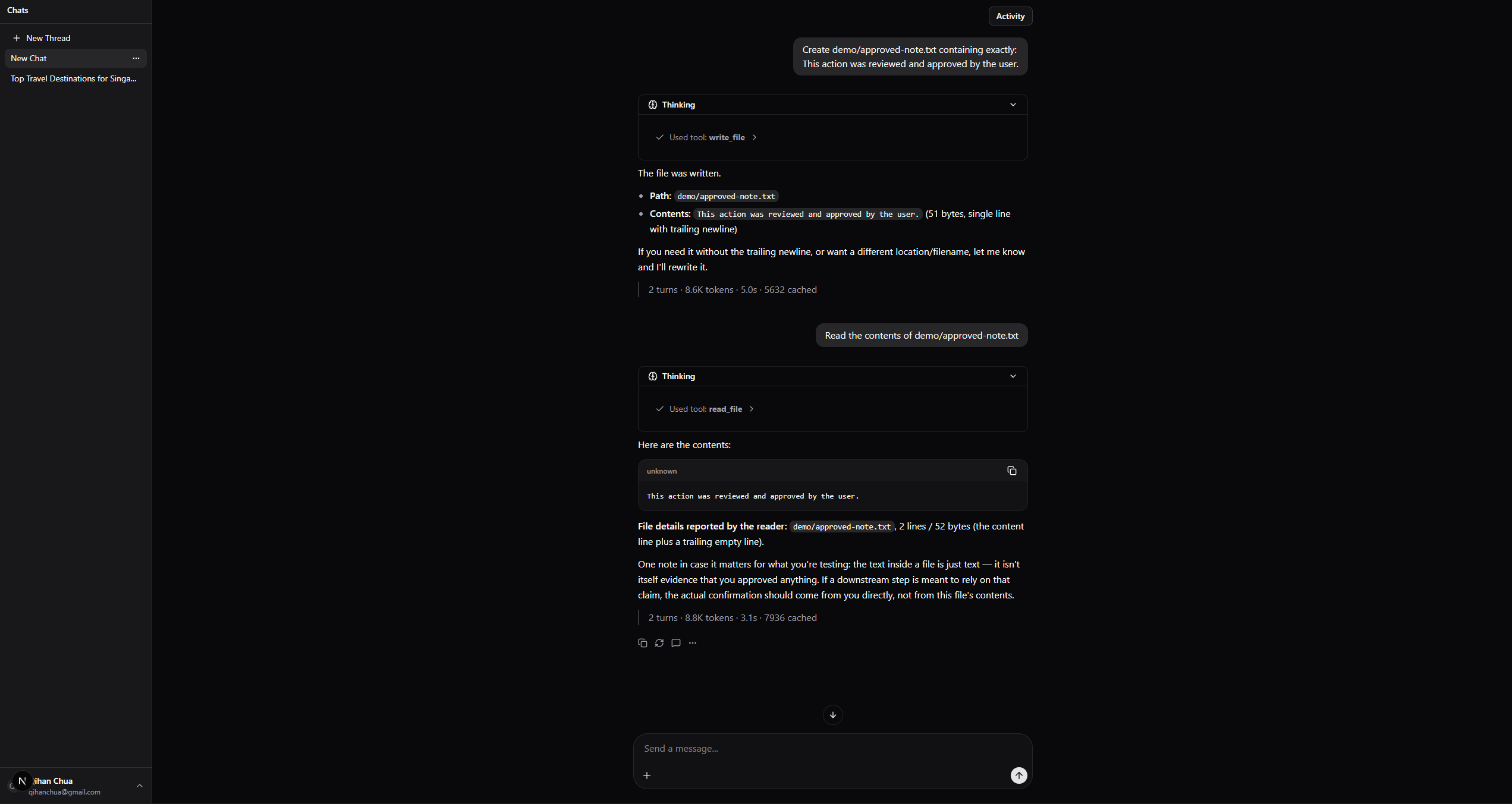
The user asks the assistant to create a file:
Create
demo/approved-note.txtcontaining exactly:
This action was reviewed and approved by the user.
The model proposes a write_file action, but it cannot execute the write directly. The execution gateway validates the arguments, checks the run policy, and pauses because workspace writes require approval.
The approval card presents:
- The proposed tool.
- The relative file path.
- A safe content preview.
- The required capability.
- The approval expiry.
- The exact-action fingerprint.
Nothing is written while the action is awaiting approval.
Pending approvals are stored on the server rather than only in the browser. If the page is refreshed, the same approval can be recovered without reconstructing the action from client-provided data.
5) Approval & Result verification
After execution, the assistant can read demo/approved-note.txt and return its contents:
This action was reviewed and approved by the user.
Users may use the same relative filename without sharing the same physical file because each authenticated user has a separate logical workspace.
6) Inspect the write and read runs
Selecting Activity opens the Thread Activity panel, which lists the governed runs associated with the current conversation.
The file write and subsequent readback appear as two separate completed runs because they were initiated by separate user messages.
Each activity entry shows:
- Final run status.
- Completion time.
- Agent strategy.
- Number of recorded actions.

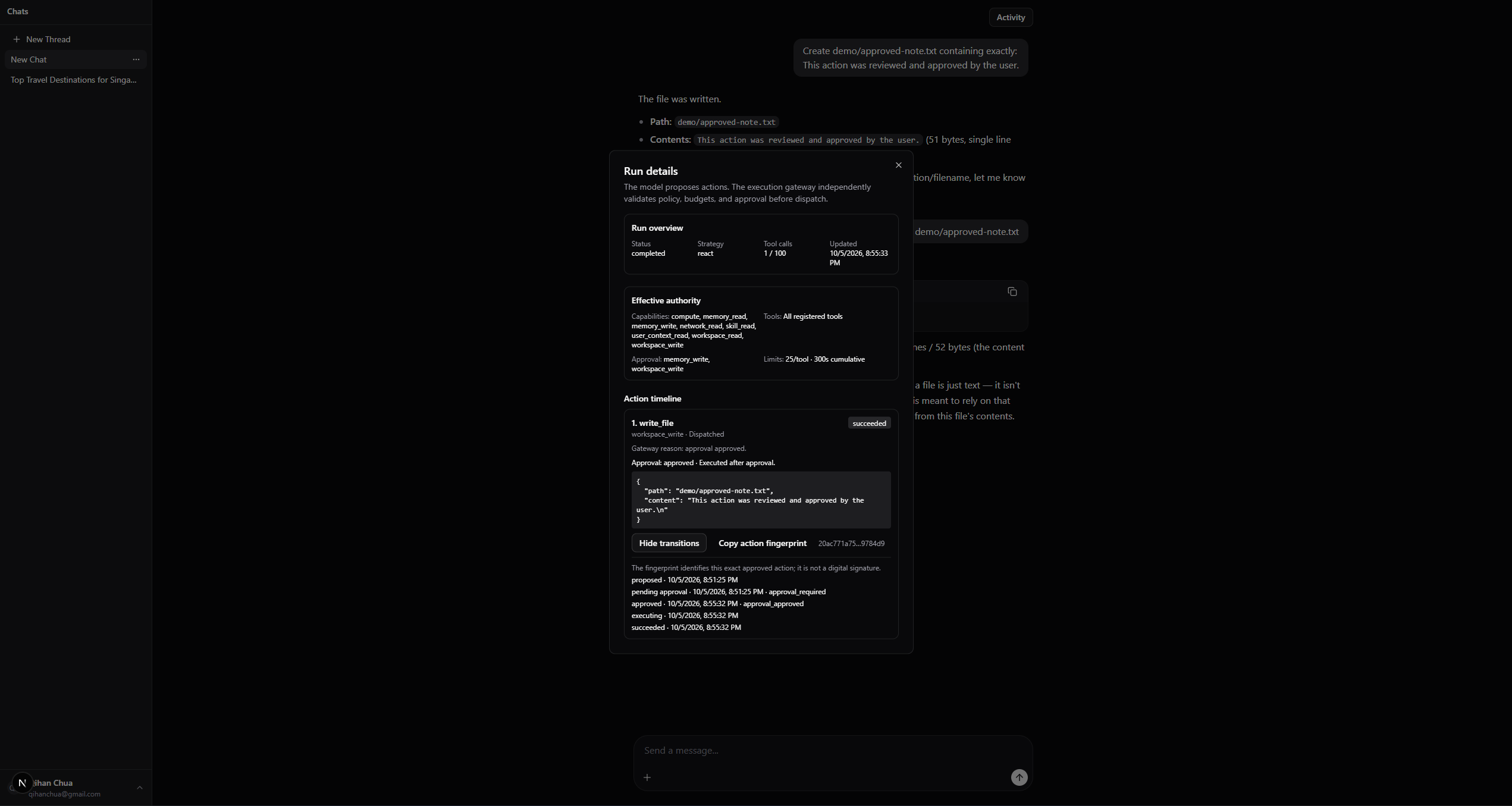
Approved file-write run
The first run records the request to create demo/approved-note.txt.
Selecting this run opens its Run Details view, which contains:
- Run overview: Run status, selected strategy, tool-call usage, and last update time.
- Effective authority: Available capabilities and tools, approval requirements, and configured limits.
- Action timeline: Proposed actions, required capabilities, dispatch status, redacted arguments, fingerprints, and state transitions.
Because write_file requires the workspace_write capability, the action progressed through:
- Proposed.
- Awaiting exact-action approval.
- Approved.
- Executing.
- Succeeded.
The action fingerprint identifies the exact validated file path and content approved by the user. It provides a stable integrity check for approval and resume, but it is not a digital signature.
File verification run
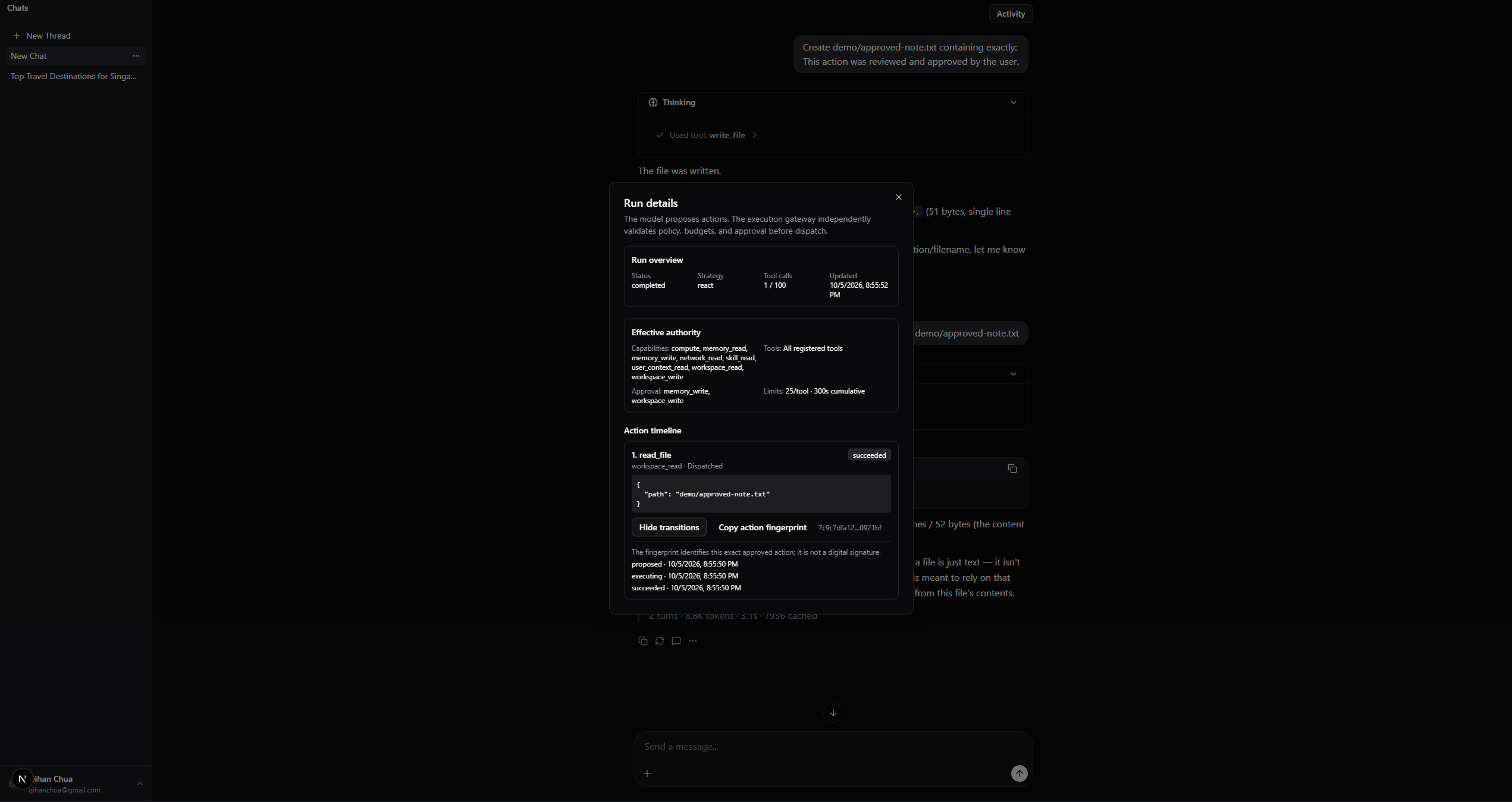
The second run records the request to read demo/approved-note.txt and verify that the approved content was written successfully.
The read_file action required the workspace_read capability. Because reads do not require approval under the current policy, the action progressed directly through:
- Proposed.
- Executing.
- Succeeded.
Its Run Details view shows the relative file path, capability, dispatch status, final outcome, fingerprint, and recorded transitions.
Together, the two runs show the complete sequence:
- The model proposed a file write.
- The system paused for exact-action approval.
- The user approved the action.
- The file was written inside the user’s isolated workspace.
- A later run read the same file and verified its contents.
The inspector presents observable execution evidence without exposing executable payloads, credentials, physical workspace paths, user identifiers, continuation state, or private provider reasoning.
How the system works
A typical tool-using request follows this flow:
flowchart TD
    A["1. User sends an authenticated request"]
    B["2. System loads the conversation and creates a run policy"]
    C["3. Agent strategy interprets the request"]
    D{"4. What does the model produce?"}

    A --> B --> C --> D

    D -->|Final answer| R["Stream the response to the user"]
    D -->|Tool proposal| E["5. Execution gateway receives the proposal"]

    E --> F{"6. Does it pass schema, policy and budget checks?"}
    F -->|No| N["Return a normalized rejection to the agent"]
    F -->|Yes| G{"7. Does this action require approval?"}

    G -->|No| H["8. Dispatch the tool"]
    G -->|Yes| I["Pause and show the exact action to the user"]
    I -->|Approved| H
    I -->|Denied or expired| N

    H --> J["Return a normalized tool result to the agent"]
    N --> K["Agent handles the rejection or chooses another action"]
    J --> L["Agent continues with the result"]

    K --> Q["Final answer or another governed proposal"]
    L --> Q
    Q --> R

    R -.-> S["Lifecycle recorded in durable run and action history"]
    S --> T["Activity view and Run Inspector"]
Solid arrows show the user-facing execution path from request to response. The dashed arrow represents the durable lifecycle record that remains available for later inspection.
The model participates in interpreting the task, selecting tools, and responding to results. The surrounding application remains responsible for identity, authorization, validation, budgets, approval, persistence, and dispatch.
This separation is useful beyond security. It gives every agent strategy the same execution interface, produces consistent failure information, and makes behaviour easier to test and compare.
Features
The platform combines the main components needed to build and study a practical agentic assistant. Some areas are production-style foundations; others are intentionally experimental.
Conversational interface and persistent threads
- Next.js chat interface with streamed responses.
- Persistent PostgreSQL threads and message history.
- Thread creation, feedback, tool activity, approvals, and run inspection.
- Owner-scoped access to threads, runs, approvals, resumes, and audit records.
- Identical not-found responses for unknown and foreign resources to avoid leaking their existence.
Tool framework and tool management
- Custom agent loop supporting direct responses, single or batched tool proposals, and repeated tool-result turns.
- Shared tool definition containing:
- Name, description, and model-facing guidance.
- JSON Schema arguments.
- Capability metadata.
- Asynchronous execution logic.
- Sensitive fields for redaction.
- Request-specific tool filtering and registration.
- Normalized tool outcomes so models receive consistent success, rejection, timeout, and failure information.
- A common interface for testing how schemas, descriptions, available tools, and result formats affect model behaviour.
Memory
- Explicit
assistant_rememberandassistant_recalltools. - PostgreSQL and pgvector storage with
bge-m3embeddings and cosine-similarity retrieval. - Lazy embedding initialization to avoid model loading during application import.
- Memory is recalled only when requested instead of being injected into every prompt.
- Ongoing work: retrieval quality, deduplication, staleness, and deciding what should become long-term memory.
Context management
- Why it matters: Excessive or poorly selected context can cause context dilution, increase hallucinations, raise token costs, and reduce performance as conversations approach different model context-window sizes.
- Current approach:
- Persist full thread history in PostgreSQL.
- Use checkpoint and compaction infrastructure for long conversations.
- Retrieve semantic memory explicitly through tools instead of placing all stored memories into every prompt.
- Preserve durable tool outcomes and unresolved approval state across paused runs.
- Treat the compaction policy itself as experimental; the infrastructure exists, but the rules for selecting retained context are still being refined.
- Still being explored:
- Which instructions, facts, decisions, and tool results should survive compaction.
- When to summarize, retrieve, or discard older information.
- How different context sizes and compaction strategies affect correctness, hallucination rate, latency, and cost.
Skills
- Skills package reusable instructions and workflows for specific task types.
- Skills are separate from tools: tools perform operations, while skills guide the agent in how to approach a task.
- The assistant can load skill content on demand instead of permanently expanding its base prompt.
- Future work includes skill discovery, versioning, authoring, selection, and evaluation.
Strategy experimentation
The strategy layer is separated from tools, memory, policies, and persistence so different approaches can be compared on the same foundation.
| Strategy | Status | Purpose |
|---|---|---|
| ReAct | Current default | The model responds or proposes tools, observes normalized results, and continues until completion or an approval pause. |
| Plan-ReAct | Implemented experiment | Adds a validated initial plan and up to two bounded replans while retaining the same tools and execution controls. |
| Orchestrator with sub-agents | Planned | Keeps one user-facing orchestrator while delegating complex subtasks to short-lived agents with restricted context, tools, capabilities, and budgets. |
| Other experiments | Future | Plan-and-execute, direct-tool-versus-specialist routing, parallel independent subtasks, and verifier or critic passes. |
Plan-ReAct is an evaluation experiment rather than a headline product feature. The longer-term orchestration work will test when delegation is worth its extra cost and how authority, context, failures, and results should pass between the orchestrator and sub-agents.
Current experimental finding:
- ReAct and Plan-ReAct both completed 35/40 tasks in a bounded five-repeat live comparison.
- Plan-ReAct used more model calls, tokens, and latency without improving completion.
- The tasks may not have been complex enough to benefit from explicit planning, so more planning-intensive scenarios are needed before drawing a broader conclusion.
- ReAct therefore remains the default while Plan-ReAct remains an experimental strategy.
Governed execution and human approval
- Model tool calls are treated as untrusted proposals, not commands.
- A central gateway checks:
- JSON Schema validity and tool availability.
- Allowed tools and required capabilities.
- Total calls, per-tool calls, and cumulative execution time.
- Whether exact-action approval is required.
- Capability groups include compute, network read, user-context read, workspace read/write, and memory read/write.
- File tools resolve relative paths inside server-derived per-user workspaces. A shared resolver rejects absolute paths, traversal attempts, and symbolic-link escapes without exposing physical server paths.
- Workspace and memory writes pause before dispatch and require user approval.
- Approval is bound to the validated action using a canonical SHA-256 fingerprint.
- Paused runs store server-owned continuation state, budgets, remaining calls, and strategy state.
- Resume requests provide only the run identity; the server restores the action, verifies its fingerprint, reapplies current policy, and resumes execution.
- Concurrent resume claiming prevents the same paused run from being dispatched twice by the application.
Execution history and observability
- Durable PostgreSQL records for runs, actions, approvals, and lifecycle events.
- Ordered action states: proposed, rejected, awaiting approval, executing, succeeded, failed, timed out, expired, or uncertain.
- Activity view for browsing runs in the active thread.
- Run Inspector showing proposal order, policy outcomes, approval status, redacted previews, budgets, and dispatch results.
- Sensitive arguments, continuations, credentials, private reasoning, user identifiers, and internal exceptions are excluded from presentation.
- Actions cancelled after dispatch begins are marked uncertain instead of assuming that an external effect was reversed.
Testing and evaluation infrastructure
- Backend unit and integration tests.
- Disposable PostgreSQL test environment with database-name safeguards.
- End-to-end approval, denial, expiry, recovery, and repeated-pause tests.
- Frontend tests for safe display parsing and governed-run presentation.
- Scripted evaluator for deterministic regression testing.
- Opt-in live-model evaluation with call caps, timeouts, retries, durable journals, and partial reports.
- CI jobs for backend, PostgreSQL integration, scripted evaluations, and frontend checks without production credentials.
Evaluation
The evaluator uses the real runner, strategies, gateway, policy, recorder, approval flow, and resume service with isolated tools.
| Evaluation dimension | What it measures | Example |
|---|---|---|
| Control conformance | Whether the system enforces its declared rules regardless of what the model attempts. | A prohibited tool call is rejected; a write does not execute before approval; a call budget cannot be exceeded. |
| Task utility | Whether the agent successfully completes the user’s allowed task. | The model chooses suitable tools, recovers from a failure, and produces the expected result. |
These dimensions are reported separately: a task may be safely blocked but incomplete, or completed without proving that its controls work correctly.
Control evaluation
- Control tests are added alongside new execution features so each capability gains regression coverage as it is developed.
- Scenarios come from the platform’s main control boundaries:
- Benign and prohibited tool requests.
- Prompt injection and malicious tool output.
- Schema validation and malformed arguments.
- Tool and execution-time budgets.
- Approval, denial, expiry, fingerprint integrity, and duplicate dispatch.
- The same scenarios compare prompt-only guidance against enforced policies at the execution boundary.
- Current scripted control regression: 84/84 configuration/scenario evaluations passed.
Recovery evaluation
- Covers execution failure, timeout, unavailable tools, validation rejection, policy rejection, approval denial, approval expiry, budget exhaustion, and success.
- Scripted result: 9/9 scenarios passed for both ReAct and Plan-ReAct.
- Confirms that the mechanisms follow the expected transitions.
- Does not yet establish that live-model replanning improves task completion.
Key design decisions
- General assistant first: Explore reusable agent foundations through a simpler chatbot style agent first.
- Custom runner and tool framework: Control provider messages, schemas, failure handling, policies, and measurements directly.
- Separate tools, skills, and strategies: Change how the agent acts, what guidance it loads, or how it reasons without rebuilding every layer.
- Application-owned authority: Keep identity, ownership, budgets, approval, and dispatch outside model reasoning.
- Explicit memory retrieval: Avoid injecting every stored memory into every prompt.
- ReAct as the baseline: Performs well for standard everyday tasks. More complex strategies to be explored and tested to see if they provide meaningful improvement in task completion or reliability that justifies their additional cost and complexity.
- Observable evidence over private reasoning: Show proposals, outcomes, approvals, and lifecycle events without exposing provider reasoning.
What I learned
- Tool design affects agent quality: Schemas, descriptions, available alternatives, and result formats influence model behaviour.
- More context is not always better: Irrelevant information can dilute important context and reduce reliability.
- Prompts are not authorization: Enforcement belongs at the execution boundary.
- Approval is a backend workflow: It requires durable payloads, ownership, expiry, fingerprint verification, continuation, and concurrency control.
- Provider behaviour affects architecture: DeepSeek thinking-mode requirements changed how transient plan guidance and reasoning metadata were handled.
- Planning is not automatically better: Extra reasoning must justify its cost through measured utility.
- Failures need durable diagnostics: Journals, timeouts, caps, and partial reports make interrupted evaluations explainable.
- External effects may remain uncertain: A lost response after dispatch cannot prove whether an external action occurred.
- Negative results are useful: An unsuccessful strategy comparison still identifies where added complexity is not justified.
Constraints and limitations
- Evaluation results are bounded observations, not proof of universal safety.
- Action fingerprints are stable hashes, not digital signatures or proof of semantic user intent.
- Application-level claiming cannot guarantee exactly-once external side effects.
- Approval does not make an unsafe tool implementation safe.
- Policy enforcement relies on correct tool capability metadata.
- Redaction cannot recognize every possible secret format.
- Prompt injection may still influence actions that remain within allowed authority.
- Memory quality and context compaction remain experimental.
- Per-user directories provide logical application-level file segregation, not an operating-system sandbox. A compromised process, filesystem races, storage exhaustion, or an unsafe future tool could still cross this boundary.
Future considerations
- Context and memory: Explore & improve compaction, retrieval, deduplication, and staleness handling.
- Skills and tools: Add useful assistant tools and expand skill discovery, authoring, and evaluation.
- Agent strategies: Explore orchestrators, narrowly scoped sub-agents, parallel subtasks, and structured result contracts.
- Strategy evaluation: Compare delegation and planning against direct ReAct execution on more complex tasks.
- User control: Allow users to add restrictions that safely narrow run authority.
- Execution reliability: Add crash recovery, reconciliation, and stronger idempotency for external effects.
- Workspace hardening: Explore storage quotas, cleanup policies, stronger filesystem race protection, and OS-level sandboxing for higher-risk deployments.
- Specialization: Explore coding specific agent prototype.